If you produce food, sooner or later you will come face to face with EU Reg. 1169/2011 — usually when you have to make a label or a product sheet and realise that "everything has to be in order". The text of the regulation is long and technical. But what you need to know in the workshop can be said simply, and that is exactly what I try to do here: not rewrite the law, but translate it into what it means at the counter.
What EU Reg. 1169/2011 is
It is the European regulation that governs the information you must give to the consumer about food — in practice, what must appear on the label and how. It applies to prepacked foods (those packaged before sale) and, for the allergen part, also to loose/non-prepacked foods.
The underlying idea is simple and right: whoever buys must be able to know what they are eating, clearly and without being misled.
What must be on the label
For a prepacked product, the main mandatory particulars are:
- Name of the food (what it is, not a fancy name).
- List of ingredients, in descending order of weight.
- Allergens highlighted within the list of ingredients (bold or other emphasis).
- Quantity of certain ingredients (QUID) when the ingredient appears in the name or is highlighted (e.g. the percentage of fruit in a jam).
- Net quantity of the product.
- Date of minimum durability ("best before") or use-by date ("use by") for perishable products.
- Storage conditions and/or conditions of use, where needed.
- Name and address of the food business operator responsible (who produces or markets).
- Country of origin or place of provenance, in the cases provided for.
- Instructions for use, if the product could not be used properly without them.
- Nutrition declaration.
Two points deserve a separate look, because they are the ones where you risk the most: allergens and the nutrition table.
Allergens: the most delicate point
Allergens must always be declared and highlighted. It is the part where a mistake weighs most, because it affects the health of the buyer. I covered it in detail in The 14 mandatory EU allergens: list and how to declare them, including the issue of derivatives (lactose = milk, lecithin = soy, malt = barley).
Nutrition declaration
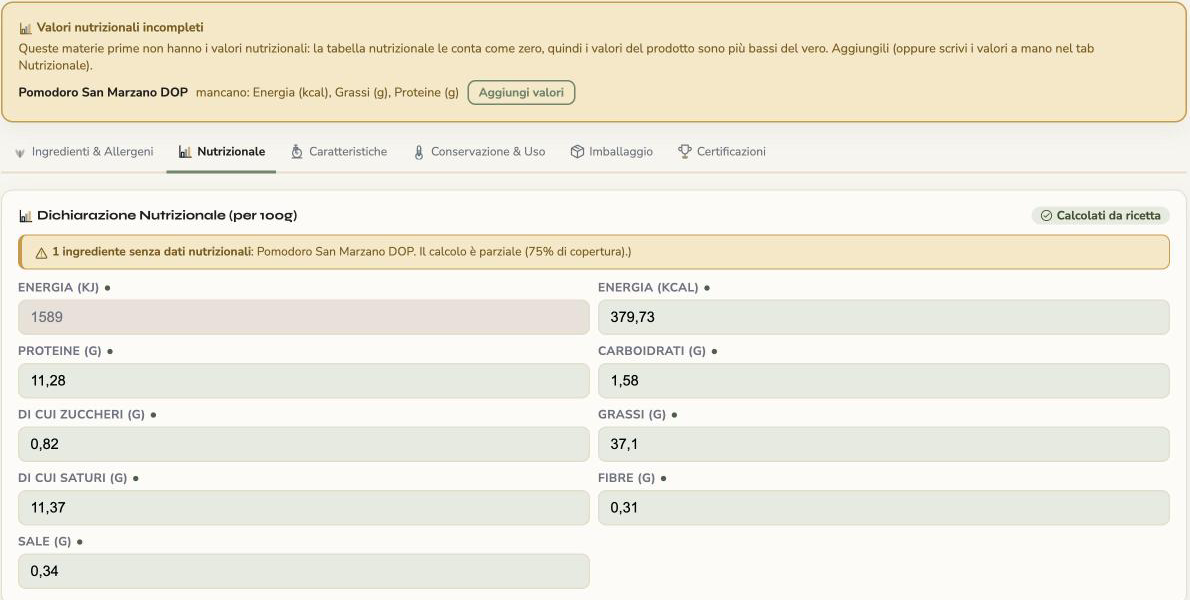
The table with energy value and nutrients (fat, of which saturates; carbohydrate, of which sugars; protein; salt) expressed per 100 g or 100 ml. For those without an analysis laboratory, it is calculated from the values of the ingredients — I explain how it works on the page dedicated to nutritional values calculated from the recipe.
Legibility: writing it is not enough, it has to be readable
A point that often goes unnoticed: the regulation also requires the information to be legible. There is a minimum character size (x-height of at least 1.2 mm) and a clear ban on misleading information — you cannot suggest qualities the product does not have. A label that is technically complete but illegible or ambiguous does not meet the rules.
What about loose products?
For non-prepacked foods (counter, delicatessen, catering) the "full" obligation does not all apply, but allergens must still be communicated — with a sign, a register or a menu. The rest of the information is partly left to national provisions.
The most common mistakes in the workshop
1. Label not updated
After a change of recipe or supplier the label simply becomes wrong.
What KoreLab does
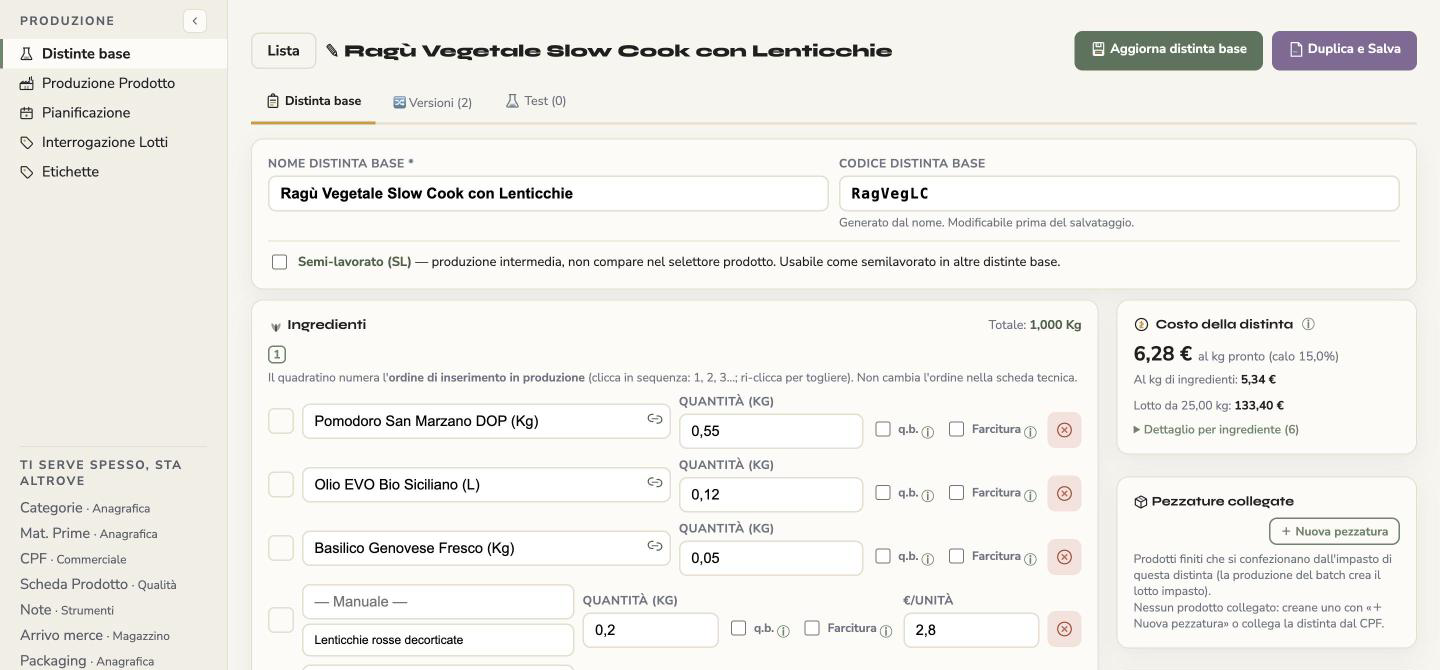
The technical sheet from which you derive the label is generated from the recipe; it is not a separate document.
Why it does it
A label goes out of date when recipe and document are two copies to be kept aligned by hand.
What it solves
You change an ingredient or a supplier and the sheet starts again from the updated data.
2. Order of ingredients
It is neither alphabetical nor random: it is by descending weight.
What KoreLab does
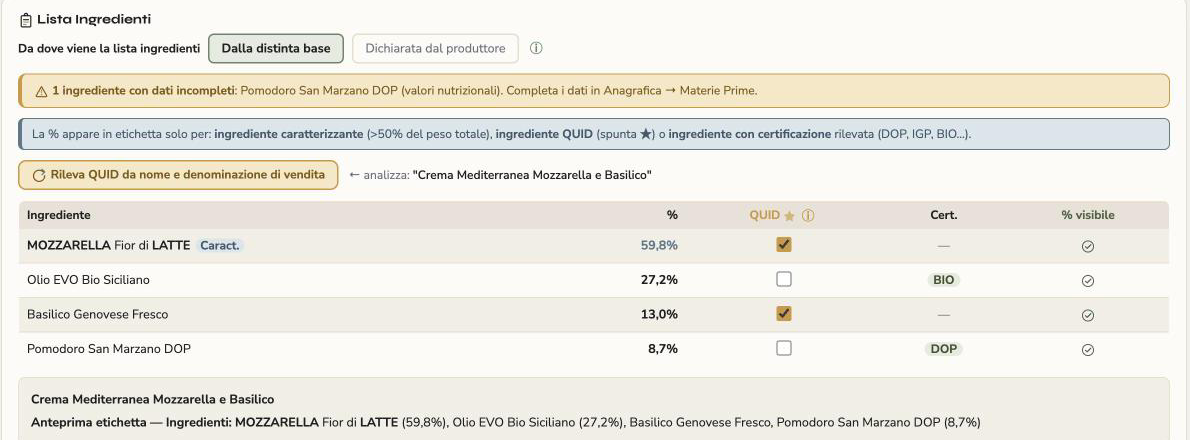
The ingredient list follows descending order of weight, calculated from the recipe quantities; the preview shows how it will be written on the label, with the percentages.
Why it does it
EU Reg. 1169/2011 asks for exactly this order, and by hand you get it wrong every time a quantity changes.
What it solves
You do not have to reorder anything after a change, and the order does not depend on the attention of whoever fills it in.
3. Allergens not highlighted
Present, but perhaps drowned in the list.
What KoreLab does
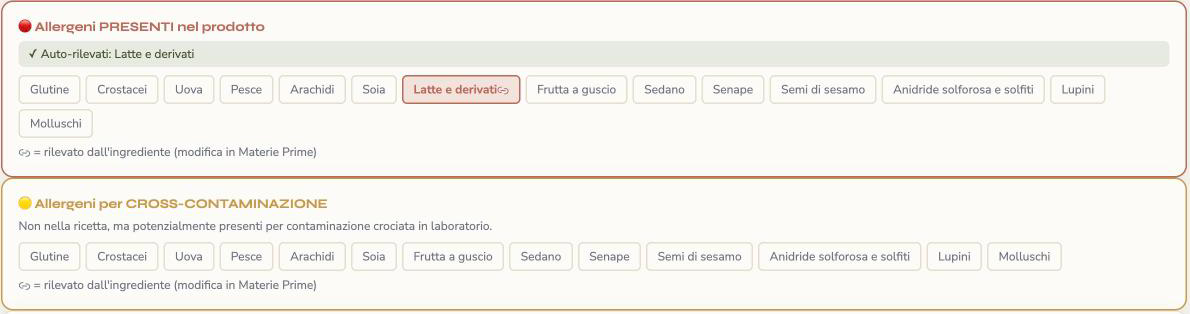
The allergens present are detected automatically from the recipe ingredients, and on the label the allergenic ingredient appears highlighted; cross-contamination is added by hand.
Why it does it
The allergen is a property of the ingredient: writing it separately means duplicating it and being able to forget it.
What it solves
If you change a raw material, the allergens change with it, and they never stay "drowned" in the list.
4. QUID forgotten
It happens when the ingredient is showcased in the name.
What KoreLab does
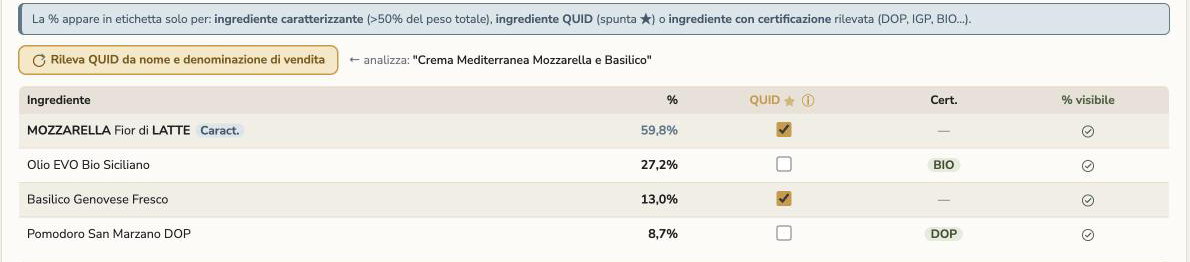
In the sheet, the button «Detect QUID from name and sales name» reads the sales name and the label name, recognises the ingredients mentioned and marks them for the percentage declaration.
Why it does it
QUID is triggered by how you name the product, and for exactly that reason it is easy not to notice that you have to declare it.
What it solves
You have a check that compares name and recipe instead of relying on memory alone.
5. Nutrition table missing or badly estimated
A missing table, or one estimated by eye, does not describe the real product.
What KoreLab does
It calculates the values per 100 g from the recipe, using the nutritional data of the ingredients; if data is missing for an ingredient, it warns you which one and that those values would be counted as zero.
Why it does it
A copied or estimated table looks complete but does not describe your product.
What it solves
The table follows the recipe and you know in advance what is missing before printing.
How to keep everything in order without going mad
The heavy part is not understanding the regulation once: it is keeping every sheet consistent and up to date while products and suppliers change. KoreLab's technical sheet is prepared under EU Reg. 1169/2011 and is generated from the recipe: ingredients in order, allergens highlighted and nutritional values per 100 g calculated automatically. You change an ingredient and the values are recalculated from the recipe; the sheet already issued is flagged «to be updated» and you regenerate it with the new data.
You can try it for free: create an account.
In short
EU Reg. 1169/2011 sets out what to write on the label and how: name, ingredients in order of weight, highlighted allergens, QUID, quantity, durability date, operator, nutrition declaration — all in a legible and non-misleading way. The theory is learned once; the real difficulty is keeping the sheets always up to date, and that is where deriving everything from the recipe makes the difference between being in order and merely believing it.